
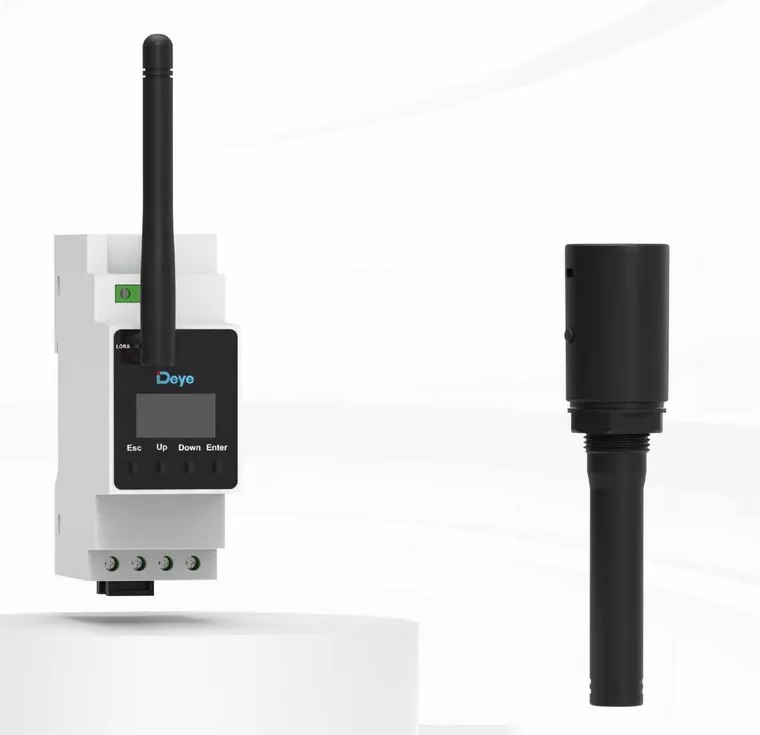
Deye Smart TX & Wireless CT (LoRa)
SUN-SMART-TXU1 + SUN-SMART-CTU2-L
Deye's LoRa link for hybrid inverters. The Smart TX (SUN-SMART-TXU1) fits into a spare COM inlet on the hybrid, connects to the inverter's meter port with the supplied RJ45 cable, and talks to up to two SUN-SMART-CTU2-L wireless CT meters and one Deye EV charger, so grid metering and zero-export control work where running a cable from the switchboard back to the inverter is impractical. AU band 920–928 MHz.
- Role
- Wireless (LoRa) grid metering and smart-device link for Deye hybrids
- One Smart TX handles
- 2 wireless CTs · 1 EV charger · 10 smart switches/plugs (combined)
- LoRa band
- 920–928 MHz
- LoRa range
- ≈200 m, barrier-free
- Smart TX power
- 5 V DC from the inverter meter port, or an external USB supply via Type-C
- Wireless CT
- DIN-rail meter · single- or three-phase · LoRa or RS485 · LCD display
- Compatibility
- Not every Deye hybrid accepts a Smart TX. Confirm model, hardware and firmware first
- Certification
- RCM (Smart TX and Wireless CT)
- Warranty
- 5 years (Smart TX and Wireless CT)
Specifications
Smart TX (SUN-SMART-TXU1)
- Function
- The main LoRa node. It connects the hybrid inverter to wireless CTs, the EV charger and smart switches/plugs
- Capacity
- Up to 2 wireless CTs, 1 EV charger and 10 smart switches/plugs (combined)
- Input voltage
- DC 5 V (under 0.3 W per Deye's multi-market TXU1 manual; the AU datasheet gives no power draw)
- Power source
- Inverter meter port via the RJ45 cable, or an external 5 V USB supply into the Type-C port when the meter port does not output 5 V
- Mounting
- Screws into a spare COM cable inlet on the inverter
- Communication
- LoRa, ≈200 m barrier-free
- LoRa frequency range
- 920–928 MHz
- Antenna
- Built-in, 0.56 dBi gain (AU datasheet; the multi-market TXU1 manual prints −0.30 dBi at 921 MHz)
- Operating temperature
- −40 to +60 °C
- Humidity
- 0–100%
- IP rating
- IP20 (IP65 once installed). Deye's multi-market TXU1 manual also marks it “Indoor use”
- Altitude
- ≤4000 m
- Size (W×H×D)
- 137.8 × 31.3 × 31.3 mm
- Weight
- 45.8 g
- Standards
- RCM, IEC/EN 62368-1
- In the box
- Smart TX, one communication cable, user manual (no USB supply or Type-C cable)
- Indicators
- LoRa and RS485 LEDs. Steady on: no communication · flashing at 1 s intervals: normal · faster flashing, both together: firmware upgrade in progress
- Warranty
- 5 years
Wireless CT (SUN-SMART-CTU2-L)
- Connection type
- L1/N single-phase or L1/L2/L3/N three-phase (L1/L2/N split-phase also listed)
- CT rated secondary output
- 50 mA / 5 A
- CT clamps
- Not stated in Deye's AU documents. Confirm what ships with the meter, and the clamp rating, with Suncloud
- Operating voltage
- 85–300 V a.c. (L-N)
- Rated frequency / range
- 50 Hz (45–55 Hz) / 60 Hz (55–65 Hz)
- Self-consumption
- ≤2 W
- AC voltage withstand
- 4 kV / 1 min
- Accuracy
- Voltage ±0.1 V · current ±0.01 A · frequency ±0.01 Hz · power ±1 W
- Communication interface
- LoRa / RS485
- LoRa range
- ≈200 m, barrier-free (Deye's AU Wireless Energy Management System brochure, 31 Aug 2026; the 21 Aug 2026 datasheet prints “/” in this cell for the CTU2-L)
- Data upload
- 100 ms (Deye AU Wireless Energy Management System brochure, 31 Aug 2026)
- Display
- LCD showing voltage, current, active and reactive power, frequency, power factor and energy
- LoRa frequency range
- 920–928 MHz
- Antenna
- External, adhesive-mount or suction-cup · −0.13 / 1.60 dBi gain
- Mounting
- DIN rail, in the distribution board
- Size
- 36 × 94 × 64 mm
- Weight
- 0.12 kg
- Operating temperature
- −40 to +60 °C
- Humidity
- 0–75%
- IP rating
- IP20
- Altitude
- ≤3000 m
- Housing
- UL94 V-0 flame-retardant (Deye AU Wireless Energy Management System brochure, 31 Aug 2026)
- Certification standards
- RCM, IEC/EN 61010-1, CE, FCC
- Warranty
- 5 years
Set-up
- Meter setting
- Advanced Function: enable “EX_Meter For CT” and set Meter Select to “Smart-TX”
- Adding CTs
- System Setup → Smart Devices → Smart CT: enter up to 2 CT serial numbers (from the nameplate) and tick Enable
- CT1 / CT2
- CT1 = wireless CT at the grid connection point · CT2 = wireless CT on the output of an on-grid (grid-tied) inverter
- Pairing
- Run a channel scan on each device to join the TX. On the CT: Param Setting → LoRa Channel → Scan Chan
- Changing channel
- Change it from the inverter, not on the TX: System Setup → Smart Devices → Smart TX, select the channel and use the inverter's Up/Down buttons. The Deye Cloud app or web can do the same. Every paired device follows automatically
- Reset Smart TX
- Restores the factory channel and clears every paired device, so all devices must be paired again
- Firmware
- If there is no Smart Devices item under System Setup, the inverter needs a firmware upgrade through after-sales support. Older hardware may not support it at all
What it does
A Deye hybrid manages export and self-consumption using readings from its grid meter. That meter normally sits at the switchboard with a cable running back to the inverter. When the inverter is in a garage or shed and the main switchboard is across the property, that cable run is the hardest part of the job.
These two devices replace the cable with a LoRa radio link:
- Wireless CT (SUN-SMART-CTU2-L): a DIN-rail meter that goes in the distribution board. It measures grid import and export, powers itself from the board (85–300 V a.c. L-N) and sends its readings to the inverter over LoRa. It also has an RS485 port for a wired link.
- Smart TX (SUN-SMART-TXU1): screws into a spare COM cable inlet on the hybrid and connects to the inverter’s meter port, giving the inverter its LoRa radio. It is sold separately and does not come with the CT or the charger.
One TX serves up to two wireless CTs, one EV charger and ten smart switches/plugs.
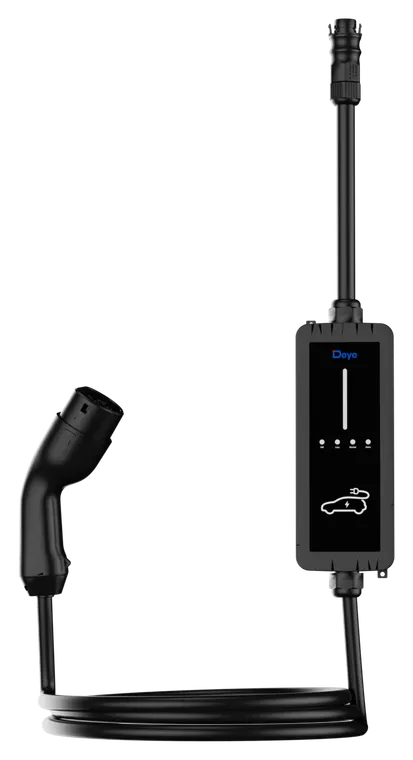
The EV charger link
The same TX lets a Deye EV charger take instructions from the hybrid. Once paired with a Deye hybrid, the charger runs in LoRa control mode, so a Smart TX must be fitted to the inverter. That link enables the modes set on the inverter:
- Solar energy only: charging starts once the battery reaches 99% SOC and stops when it falls to 95%. “Solar sell” must also be enabled.
- Time of charge: scheduled charging windows.
- Off-grid charge cut-off: the charger stops when the inverter goes off-grid and the battery is at or below the set SOC.
Before you quote it
- Check the inverter first. Deye’s documents disagree. The TX datasheet (21 Aug 2026) says the TX integrates with all Deye hybrid inverters and gives no condition, and the Wireless Energy Management System brochure’s cover says the same. Deye’s AU brochures (Smart EV Charger, Jul 2026; Wireless Energy Management System, 31 Aug 2026) add that the inverter must run the latest firmware. Yet both brochures also say not all Deye hybrids support a Smart TX and ask you to confirm compatibility with Deye first, as does the EV charger manual (V1.2.0). The inverter needs firmware that shows a “Smart Devices” item under System Setup, and Deye’s commissioning guide warns that some older hardware cannot take that firmware. Send the model and serial number to Suncloud before quoting.
- Power for the TX. The TX takes 5 V from the inverter’s meter port. Where that port does not supply 5 V, power the TX from an external 5 V USB supply into its Type-C port. The box holds only the TX, one communication cable and the manual.
- One meter setting. The TX uses the inverter’s meter port and is enabled with Meter Select = “Smart-TX”, the same setting a wired meter uses. Plan for one or the other, and confirm with Suncloud before designing a site that needs both.
- Two CT roles. CT1 measures the grid connection point. CT2 measures the output of an existing on-grid (grid-tied) inverter on the same site.
- Smart plugs and switches. The TX’s capacity includes up to ten Deye smart plugs and smart switches, but Suncloud does not list them and Deye’s brochures show a European-style plug. Ask Suncloud about AU availability before offering them.
- Range is a best case. ≈200 m is Deye’s barrier-free figure. Walls, metal switchboard enclosures and distance all reduce it, so test the link on site. Deye lists the CT’s LoRa link for hybrid inverters and its RS485 link for hybrid and string inverters.
- String-inverter sites. Deye’s AU Wireless Energy Management System brochure (31 Aug 2026 update) also shows a layout with no hybrid and no Smart TX: a string inverter or microinverter, a wireless CT at the main distribution box that reports to Deye Cloud over Wi-Fi, and the EV charger linked to that CT over LoRa. Deye’s diagram does not name the CT model. Of the two AU wireless CTs on the 21 Aug 2026 datasheet, only the SUN-SMART-CTU2-WL has Wi-Fi (LoRa, RS485, Wi-Fi and Bluetooth); the CTU2-L on this page has LoRa and RS485 only. Suncloud has not confirmed a layout without a hybrid, so ask before designing around it.
- Outdoor inverters. Deye’s TX manual (Ver 1.4.0, a multi-market edition, not an AU one) marks the TX “Indoor use”, while the AU datasheet rates it IP65 once fitted to the inverter. Many hybrids are mounted outdoors, so confirm with Suncloud before fitting a TX to an outdoor inverter.
- Response time. Deye’s Wireless Energy Management System brochure quotes a 100 ms data upload for the CT and compares a 0.2 s LoRa zero-export response with a “typical” 3–5 s for Wi-Fi solutions. That comparison is manufacturer marketing, not a tested figure. Do not offer it to a network as a compliance response time.
Commissioning at a glance
- Fit the TX into a spare COM inlet, then run the supplied cable from its RJ45 port to the inverter’s meter port. Add a Type-C USB supply if the meter port has no 5 V.
- Advanced Function: enable “EX_Meter For CT” and set Meter Select to “Smart-TX”.
- System Setup → Smart Devices → Smart CT: enter the CT serial number(s) and tick Enable.
- On each CT: Param Setting → LoRa Channel → Scan Chan to join the TX.
- Press Up/Down from the inverter detail page to open the Smart Devices page and confirm the CT readings appear.
“Reset Smart TX” clears every paired device. Use it only if you intend to pair everything again.
Figures are from Deye’s AU datasheets for the SUN-SMART-TXU1 and the SUN-SMART-CTU2-L (both 21 Aug 2026 editions), the AU Wireless Energy Management System brochure (31 Aug 2026 update), the AU Smart EV Charger brochure (8 pages, Jul 2026), the TXU1 user manual (Ver 1.4.0), Commissioning Steps of the Smart Devices (Ver 1.1, Sep 2026) and the EV charger user manual (V1.2.0). The TXU1 manual (linked above, as Deye publishes it) is a multi-market edition carrying US FCC wording, not an AU one. The TX power draw, part list, indicator states and “Indoor use” marking come from it, because we hold no AU edition. Confirm inverter compatibility with Suncloud before quoting.
Plan & design
Before anything is ordered — sizing, pairing and design decisions for the Deye Smart TX & Wireless CT (LoRa).
Operate & configure
Monitoring, tariffs, work modes — getting the most out of the system after handover.
Documents
Everything published for the Deye Smart TX & Wireless CT (LoRa) — and where something is missing, it says so instead of hiding the row.
System & shared documents
Not specific to the Deye Smart TX & Wireless CT (LoRa) — these apply across the range and live here once, not copied per model.
