
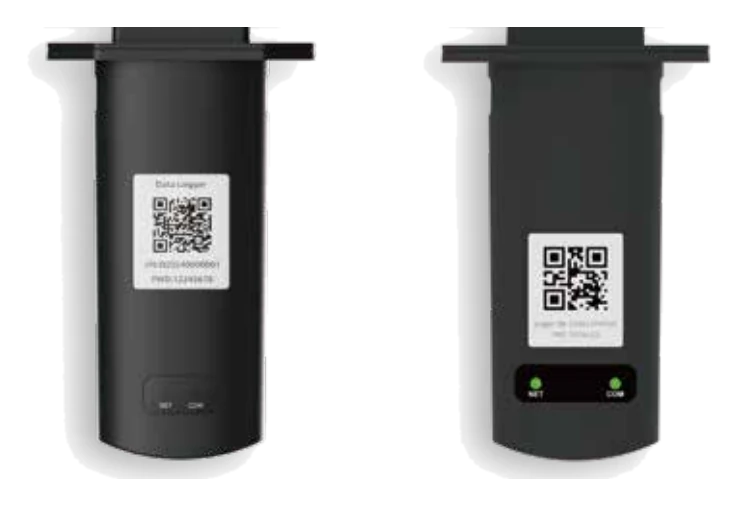
Deye Data Loggers — DL1000B Wi-Fi, 4G & Ethernet
DL1000B-WIFI / DL1000B-4G / DL1000B-ETH
The DL1000B stick that puts a Deye system online. Plugs into the inverter's USB logger port and streams to DeyeCloud — DL1000B-WIFI where the customer's network reaches the inverter, DL1000B-4G cellular where it doesn't, DL1000B-ETH over a wired LAN. Registered to a plant by its serial number.
- Role
- Inverter → DeyeCloud monitoring link
- Variants
- DL1000B-WIFI (Wi-Fi) · DL1000B-4G (cellular) · DL1000B-ETH (Ethernet LAN)
- Fitting
- Plugs into the inverter's USB logger port; flange fixed with two screws
- Registration
- Added to the DeyeCloud plant by logger SN
- Wi-Fi band
- 2.4 GHz only (WIFI and ETH versions)
- When to fit 4G
- Weak, absent or unreliable site Wi-Fi — rural sites, sheds, new builds
- IP rating
- IP65
Specifications
Connectivity
- Wi-Fi
- DL1000B-WIFI: 2.4 GHz · DL1000B-4G: not supported · DL1000B-ETH: 2.4 GHz
- 4G
- DL1000B-4G only: LTE-FDD B1/3/5/7/8/20/28 · LTE-TDD B38/40/41
- LAN
- DL1000B-ETH only: 10/100 Mbit/s
Hardware
- Serial interface
- 1 × UART
- Indicators
- 2 × LED
- Data interface
- USB
- Power supply
- 5 V DC
- Operating temperature
- −40 to +65 °C
- Ingress protection
- IP65
- Dimensions (W×D×H)
- 116.6 × 70.5 × 30.5 mm
- Software
- AT command, OTA firmware update, data backfilling
Setup
- Wi-Fi configuration
- Via the DeyeCloud app onboarding — see the Wi-Fi logger guide
- 4G configuration
- No site network needed; registers by SN like a Wi-Fi logger
- Carrier note
- Telstra-network configuration note available under Documents
Which one to fit
Fit the DL1000B-WIFI when the customer’s network reliably reaches the inverter — the Wi-Fi logger & DeyeCloud guide covers onboarding end to end. Fit the DL1000B-4G where Wi-Fi is weak, absent or political: rural sites, sheds, new builds waiting on NBN. The 4G logger guide covers the SIM, signal and DeyeCloud registration; fit the stick as described below. Fit the DL1000B-ETH where a network cable can be run to the inverter; it connects to the router over a 10/100 Mbit/s LAN.
The DL1000B-WIFI is the logger Suncloud lists. Ask Suncloud about the 4G and ETH versions.
Wi-Fi on the WIFI and ETH versions is 2.4 GHz only. The logger cannot join a 5 GHz-only network, so check the router has a 2.4 GHz band switched on before you blame the stick.
The DL1000B has a USB data interface: it plugs into a USB-type logger port and is held by two screws through its flange. Deye’s SUN-5–12K-SG04LP3 manual notes that an inverter can arrive with either a USB or a DB9 (RS232) logger port, so check the port on the inverter being supplied before ordering a logger.
If a system has dropped offline, start at Wi-Fi logger offline before replacing hardware — most “dead logger” calls are a changed router password.
Figures are from Deye’s Stick Logger catalogue pages (DL1000B-WIFI/4G and DL1000B-ETH, catalogue pp. 67–68, received June 2026), the DL1000B-ETH quick guide (V1.1, January 2026, fitting) and the SUN-5–12K-SG04LP3 AU user manual (V3.3.0, logger port types). Confirm the logger version, the inverter’s logger port and the site’s network with Suncloud before quoting or installing.
Operate & configure
Monitoring, tariffs, work modes — getting the most out of the system after handover.
Troubleshoot
Known issues for this model, worst first — and every fault code it can show.
Documents
Everything published for the Deye Data Loggers — DL1000B Wi-Fi, 4G & Ethernet — and where something is missing, it says so instead of hiding the row.
System & shared documents
Not specific to the Deye Data Loggers — DL1000B Wi-Fi, 4G & Ethernet — these apply across the range and live here once, not copied per model.
